Documents module
Match every POD to the right trip and delivery
PODs from drivers, owner-operators and subcontractors are collected from every channel, read even when handwritten and matched to the right trip, so the customer gets delivery confirmation at once and you close the trip sooner.
What the module does
PODs come from drivers, owner-operators and subcontractors on different channels; they end up attached to the right trip, read and checked.
Collected from every channel
PODs received by email, on WhatsApp, from the scanner or from portals gathered in one place.
Read even when handwritten
Signatures, stamps, dates and notes read even on phone photos and documents filled in by hand.
Matched to the trip
Each POD linked to the right trip and delivery by cross-checking consignee, date, references and packages.
Reservations and pallets
Reservations, noted damage and EPAL pallet exchange picked up and recorded on the trip.
Delivery confirmation
The customer gets delivery confirmation with the POD attached as soon as the document is checked.
A searchable archive
PODs stay attached to the trip in the TMS and can be found by customer, date or reference.
Stop chasing delivery documents
Invoice sooner
PODs are matched to the trip as soon as the delivery ends, so you invoice without waiting.
No more calls to drivers
Drivers send their documents on WhatsApp, and nobody has to hunt for missing PODs.
Reservations caught right away
Notes written on the delivery note surface the same day, before they turn into disputes.
The driver sends a photo, quadra does the rest
Drivers keep sending the photo of the signed delivery note on WhatsApp. quadra reads it, matches it to the trip and flags any anomalies.
Every POD finds its trip on its own
From the driver’s photo to the POD attached to the trip.
Luca · driver
IMG_2208.jpg
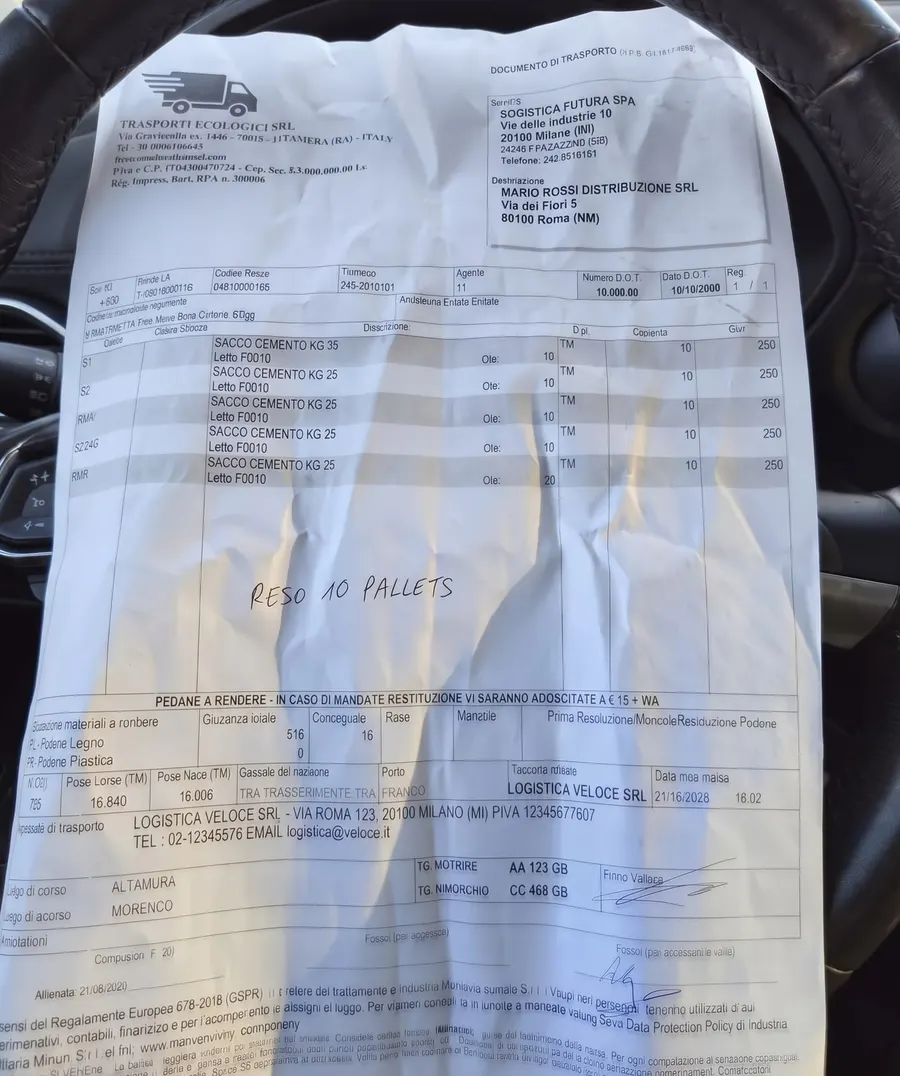
- Reading the photo of the note
- Recognising the signature
- Matching the POD to the trip
- Comparing packages with the order
- Recording the returned pallets
POD read
10 pallets returned
Mario Rossi Distribuzione · Rome
Note written by hand
Explore the other modules

The answers you’re looking for
What operations teams ask us before handing a process over to an agent.
Have another question?
Does it read photos taken on a phone?
Yes, including photos taken by drivers and documents filled in by hand, with their signatures, stamps and notes in the margin.
How does it know which trip a POD belongs to?
It cross-checks what it reads on the document, such as consignee, date, references and number of packages, against the open trips in the TMS. When the match isn’t certain, it asks the operator to confirm.
Do subcontractors need to install anything?
No. They keep sending PODs the way they do today, by email or on WhatsApp, and quadra reads them from there.
What happens when a POD carries reservations?
The reservation is read and recorded on the trip together with the page or photo it appears on, and the operator is notified so they can settle it with the customer or the carrier.
Where do the PODs end up?
They stay attached to the trip in the TMS and can be found by customer, date or reference, without digging through the inbox.
Have another question?